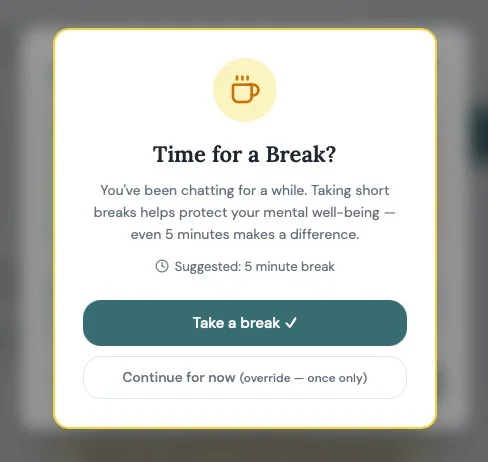
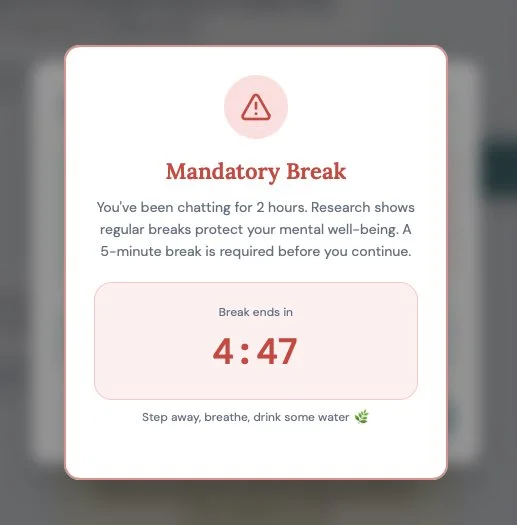
Check-in - An AI feature to give the user a break

Being part of the software design industry, I know how manipulative digital products can be if designed with the primary goal of using quantitative measurement that the industry calls “engagement metrics” to incentivize business owners and product managers to tell execs a story about success. If designed carelessly, poorly, or unethically, that hyper-focus on quantitative metrics of people’s behavior to decide if a product is good could ignore the harm a product does to people who may be at risk and not realize it.

In business use cases, AI tools are unquestionably helpful and expedite workloads, and have become incredibly controversial as a result. One concern is an addictive nature some were built with to reinforce use of the product through the way they design the responses the products use to encourage people to use it more.

Why is this needed?

We’ve already seen the harmful effects they have on at-risk groups.

As a designer myself, I started to wonder what the industry can do to help people recognize this more clearly and responsibly, especially those who may not be aware or lose sight of how addicting and exploitive any consumer digital product can be.

Especially products engineered to be addictive and built by Careless People.

AI tools can be as problematic as maliciously designed social media apps. It can feel empowering to people to quickly build software products faster.

It is democratizing and can feel like cracking through a walled garden, or the fast track to an exclusive club with high compensation, a shortcut into a separate culture with its own vocabulary and use of acronyms that sound like technobabble to those not part of the culture.

I wondered what a more ethical AI product would look like.

How could an AI tool observe user behavior, but not be so exploitive of people at any age who may forget that a product is designed to collect data from them, especially for the more vulnerable who may be neurodivergent?

How could we encourage more intentional use of design patterns that aren’t solely created to drive “engagement metrics” that make someone look good to their boss?

Then I remembered this:

This was a choice by Nintendo designers for Wii Sports. They knew how fun and addicting games can be, and were thoughtful enough to limit screen time before modern, always online platforms gave us scheduling and time-limiting parental controls.

Knowing we have a mental health crisis in the U.S., I wondered what this check-in style of messaging might look like for an AI product, especially in the consumer space. A more ethically designed AI tool with some checks in the user could help align AI towards what Tristan Harris explores in his design ethics consulting and helps offset what Cory Doctorow has been observing and calling the enshittification of products and services lately.

While learning design in college, my instructors recommended we all take breaks even when we are in what psychologists call flow states of creativity and productivity.

It helped me to take a break from illustration projects to make sure I wasn’t hyper-focused on one area, risking the quality of the work by literally losing sight of the big picture.

I thought it would be interesting to see if generative AI can be used for designing an AI check-in system for a safer chatbot user experience.

In order to demonstrate what work and thought was put into this effort, I am sharing the instructions I wrote and entered as input into a few AI tools to explore how their outputs vary when providing design options.

The instructions below are written in Markdown, a shorthand of HTML, the language used to tell web browsers how to structure the content of a website page with used on all websites and software, developed by John Gruber.

AI tools can easily read this format and understand the context of the instructions being given to it as a recipe for what an AI tool should follow to create the output: options for a user experience design team to consider and refine to add to an AI tool that would enable people with disabilities to have an alert design system that makes them aware that overuse of an AI tool could be harming their mental health.

Below is what these instructions look like in the Markdown format.

Markdown is a benefit over writing the instructions in HTML, because it uses less characters in the text instructions machine learning AI tools need as an input to create something for the person using it. Using less characters is a hack that lets people type less characters to provide an AI instructions that are also more efficient for the tool to read.

# Ethical AI Framework for User Safety & Well-Being

**Version:** 1.0

**Date:** May 26, 2026

**Author:** Evan Wiener

---

## 1. Executive Summary

### 1.1 Purpose

This document defines requirements for an **Ethical AI Framework** designed to prioritize **user mental health, education, and transparency** in AI tools. The framework mitigates risks such as loneliness, addiction, neurodivergence challenges, and manipulative design while empowering users with safeguards, educational resources, and transparent interactions.

### 1.2 Objectives

- **Mitigate Harm** — Reduce risks of emotional dependency, addiction, and manipulative design in AI interactions.

- **Empower Users** — Provide tools for users to understand, control, and reflect on their AI usage.

- **Ensure Transparency** — Disclose AI engagement tactics and provide explainable, auditable interactions.

- **Support Neurodivergence** — Accommodate diverse cognitive needs (e.g., ADHD, autism) with customizable, accessible designs.

- **Compliance** — Align with global ethical guidelines (EU AI Act, UNESCO, APA).

### 1.3 Target Audience

- **Primary Users** — Individuals interacting with AI chatbots or voice assistants (general users, neurodivergent users, those prone to loneliness or addiction).

- **Secondary Users** — Developers, designers, mental health professionals, and organizations implementing AI tools.

- **Stakeholders** — Product managers, ethicists, regulators, and mental health advocates.

### 1.4 Scope

**In Scope:**

- Ethical safeguards (session limits, break prompts, emotional check-ins)

- User education (AI literacy tutorials, manipulative design awareness)

- Transparency features (usage dashboards, disclaimers, algorithmic audits)

- Neurodivergence support (customizable interactions, sensory-friendly UI)

- Crisis intervention protocols (mental health resource redirection)

**Out of Scope:**

- Hardware requirements

- Backend infrastructure for non-AI components

- Legal compliance beyond ethical design (GDPR, HIPAA)

---

## 2. Product Overview

### 2.1 Description

The Ethical AI Framework is a set of design and technical requirements for AI tools (chatbots, voice assistants) that:

1. Monitor and limit usage to prevent addiction

2. Detect and address emotional distress (loneliness, anxiety)

3. Educate users on AI mechanics and manipulative design

4. Provide transparency into AI decision-making and engagement tactics

5. Support neurodivergent users with customizable, accessible interactions

### 2.2 Key Features

| Feature | Description | Priority | Success Metric |

|---|---|---|---|

| Session Timer | Real-time display of usage duration | High | % of users taking breaks after alerts |

| Break Alerts | Soft lockouts after prolonged use with override options | High | % of users complying with break suggestions |

| Emotional Check-Ins | Periodic prompts with emoji options (😊 😐 😩) | High | % of users engaging with check-ins |

| Crisis Resource Button | Floating button linking to mental health resources | High | % of distressed users accessing resources |

| Transparency Disclaimers | Inline disclaimers in AI responses | High | % of users reporting increased trust |

| Usage Dashboard | Weekly summary of time spent, sessions, and emotional patterns | Medium | % of users reviewing data weekly |

| AI Literacy Tutorials | Interactive tutorials on AI mechanics and manipulative design | Medium | % of users completing tutorials |

| Neurodivergence Modes | Customizable interactions (text-only, slower voice, no animations) | Medium | % of neurodivergent users enabling modes |

| Algorithmic Audits | Third-party audits for bias, manipulative design, and accessibility | Medium | # of audits completed per quarter |

| Customizable Safeguards | User-set limits (session length, break frequency) | Low | % of users customizing safeguards |

---

## 3. Detailed Requirements

### 3.1 Functional Requirements

#### 3.1.1 Mental Health Safeguards

- **FR-001** — The system **must** display a **session timer** in the UI header, updating in real-time.

- **FR-002** — The system **must** trigger a **break alert** after 1 hour of continuous use, suggesting a 5-minute break.

  - Users may override the alert once per session.

  - After 2 hours, the system **must** enforce a **5-minute mandatory break** (no override).

- **FR-003** — The system **must** conduct **emotional check-ins** every 30 minutes of use.

  - Check-ins **must** include emoji options (😊, 😐, 😩) and a free-text field.

  - If 😩 is selected, the system **must** suggest a break or redirect to crisis resources.

- **FR-004** — The system **must** include a **floating crisis resource button** (🆘) that appears when:

  - The user expresses distress keywords (e.g., "lonely," "hopeless," "self-harm").

  - The user ignores 3 consecutive break alerts.

  - The button **must** link to mental health hotlines, therapy resources, or human support options.

- **FR-005** — The system **must** display **transparency disclaimers** in AI responses that:

  - Clarify the AI's limitations ("I'm an AI and can't replace human connection").

  - Disclose engagement tactics ("This response uses positive reinforcement to keep you engaged").

#### 3.1.2 User Education

- **FR-006** — The system **must** provide an **AI literacy tutorial** accessible via the settings menu.

  - The tutorial **must** explain:

    - How the AI generates responses (data-driven, not human-like understanding)

    - Common manipulative design tactics (infinite scroll, sycophantic responses)

    - How to recognize and resist dark patterns

- **FR-007** — The system **must** include **critical thinking prompts** after long sessions (>1 hour).

  - Example: *"What's one thing you could do today that doesn't involve me?"*

- **FR-008** — The system **must** suggest **offline alternatives** (journaling, calling a friend) when:

  - The user expresses emotional dependency ("I only talk to you").

  - The user exceeds daily usage limits (>4 hours).

#### 3.1.3 Transparency

- **FR-009** — The system **must** provide a **usage dashboard** accessible via a 📊 button in the footer displaying:

  - Total time spent in the current session

  - Number of sessions in the past week

  - Emotional patterns (most common emoji from check-ins)

  - Option to set custom limits (session length, break frequency)

- **FR-010** — The system **must** allow users to **opt out of disclaimers** but default to full transparency.

- **FR-011** — The system **must** undergo **quarterly third-party audits** for:

  - Manipulative design (dark patterns, sycophantic feedback loops)

  - Bias (racial, gender, neurodivergent)

  - Accessibility (sensory-friendly UI, literal communication)

  - Audit reports **must** be published publicly.

#### 3.1.4 Neurodivergence Support

- **FR-012** — The system **must** offer **customizable interaction modes** including:

  - Text-only mode (no voice or animations)

  - Slower voice pace (for voice assistants)

  - No animations/sounds (sensory-friendly mode)

  - Literal communication (no sarcasm or implied meaning)

- **FR-013** — The system **must** provide **short, frequent breaks** (5 minutes every 30 minutes) for users who enable **ADHD mode**.

- **FR-014** — The system **must** use **predictable patterns** (consistent break reminders, advance warnings) for users who enable **autism mode**.

---

### 3.2 Non-Functional Requirements

#### 3.2.1 Performance

- **NFR-001** — The system **must** respond to user inputs within **2 seconds** (95th percentile latency).

- **NFR-002** — The session timer and break alerts must update in **real-time** without lag.

#### 3.2.2 Accessibility

- **NFR-003** — The system **must** comply with **WCAG 2.1 AA** standards.

- **NFR-004** — The system **must** support **screen readers** and **keyboard navigation**.

- **NFR-005** — The system **must** provide **high-contrast mode** and **adjustable text sizes**.

#### 3.2.3 Security & Privacy

- **NFR-006** — The system **must** encrypt all user data using **AES-256**.

- **NFR-007** — The system **must** allow users to **delete their usage data** at any time.

- **NFR-008** — The system **must** comply with **GDPR** and **CCPA**.

#### 3.2.4 Scalability

- **NFR-009** — The system **must** support **10,000 concurrent users** without performance degradation.

- **NFR-010** — The system **must** scale to **100,000 users** within 6 months of launch.

---

### 3.3 Technical Requirements

#### 3.3.1 Frontend

- **TR-001** — The UI **must** be built using **React.js** (web) or **Swift/Kotlin** (mobile).

- **TR-002** — The session timer and break alerts must use **JavaScript/TypeScript** with a countdown library (e.g., `react-countdown`).

- **TR-003** — Emotional check-ins must use **modals** (e.g., `react-modal`) with emoji picker libraries.

- **TR-004** — The usage dashboard must use **charting libraries** (e.g., `Chart.js`, `Recharts`).

#### 3.3.2 Backend

- **TR-005** — The backend **must** use **Node.js (Express)** or **Python (FastAPI/Flask)**.

- **TR-006** — The system **must** store user data in a **PostgreSQL** or **MongoDB** database.

- **TR-007** — The break alert logic must be implemented as a **server-side timer** to prevent client-side tampering.

- **TR-008** — The crisis resource button must fetch from a **curated, updatable database** (e.g., Firebase, Airtable).

#### 3.3.3 AI/ML

- **TR-009** — Emotional check-in analysis must use **NLP libraries** (e.g., `NLTK`, `spaCy`) to detect distress keywords.

- **TR-010** — The voice assistant must use **speech-to-text** (e.g., Google Speech-to-Text, Whisper) and **text-to-speech** (e.g., Amazon Polly).

- **TR-011** — Neurodivergence modes must allow users to toggle settings that adjust AI response style.

#### 3.3.4 Third-Party Integrations

- **TR-012** — The system **must** integrate with **mental health APIs** (e.g., Crisis Text Line, 7 Cups).

- **TR-013** — The system **must** use **analytics tools** (e.g., Google Analytics, Mixpanel) to track usage patterns (with user consent).

---

### 3.4 UI/UX Requirements

#### 3.4.1 Layout (Text Chatbot)

- **Header** — App logo, session timer, break alert indicator

- **Chat Area** — User input, AI responses with disclaimers, emotional check-ins, crisis resource button

- **Footer** — Text input bar, send button, usage dashboard button (📊)

#### 3.4.2 Layout (Voice Assistant)

- **Header** — Assistant avatar, session timer, break alert

- **Voice Interaction Area** — User voice input, assistant responses with disclaimers, emotional check-ins, crisis resource button

- **Footer** — Voice input button, usage dashboard button (📊)

#### 3.4.3 Design System

| Token | Value | Usage |

|---|---|---|

| Primary | `#3498db` | Trust, calm, interactive elements |

| Background | `#f0f0f0` | Neutral surfaces |

| Alert | `#ff4444` | Break prompts, crisis buttons |

| Success | `#2ecc71` | Positive confirmations (break taken) |

- **Typography** — Open Sans or Arial, minimum 16px

- **Dark mode** support required

---

## 4. Success Metrics

| Metric | Target | Measurement |

|---|---|---|

| User Break Compliance | 70% of users take breaks after alerts | Track % who comply with break suggestions |

| Emotional Check-In Engagement | 60% of users respond to check-ins | Track % who select emoji or provide feedback |

| Crisis Resource Access | 80% of distressed users click 🆘 | Track % who access resources when distressed |

| Usage Dashboard Views | 50% of users review data weekly | Track % who open the dashboard |

| AI Literacy Tutorial Completion | 40% of users complete the tutorial | Track % who finish the tutorial |

| Neurodivergence Mode Adoption | 30% of neurodivergent users enable modes | Track % who toggle settings |

| User Trust Score | 85% positive feedback on transparency | Survey users on trust in AI responses |

| Session Duration Reduction | 15% reduction in average session length | Compare pre/post implementation data |

---

## 5. Assumptions & Dependencies

### 5.1 Assumptions

- Users will engage with ethical checks if they are non-intrusive and valuable.

- Mental health organizations will partner to provide crisis resources.

- Third-party auditors will be available and affordable for quarterly reviews.

### 5.2 Dependencies

| Dependency | Description | Owner |

|---|---|---|

| Mental Health API | Integration with crisis resource databases (e.g., Crisis Text Line) | Product Manager |

| NLP Libraries | Access to `spaCy`, `NLTK` for emotional analysis | Backend Team |

| Third-Party Auditors | Availability for bias, manipulative design, and accessibility reviews | Compliance Team |

| User Feedback Tools | Tools for collecting in-app feedback | UX Research Team |

---

## 6. Risks & Mitigation

| Risk | Impact | Mitigation |

|---|---|---|

| Users ignore break alerts | Reduced safeguard effectiveness | Gamify breaks (rewards for compliance) |

| Crisis resources become outdated | Users receive incorrect help | Partner with reputable mental health orgs for updates |

| Neurodivergence modes unused | Low accessibility feature adoption | User testing with neurodivergent groups |

| Audits reveal bias or manipulation | Reputation damage, user distrust | Fix issues immediately; publish transparent reports |

| Performance degradation | Poor user experience | Optimize backend; load test before launch |

---

## 7. Timeline & Milestones

| Phase | Tasks | Timeline | Owner |

|---|---|---|---|

| Research & Planning | Finalize PRD, stakeholder feedback, tool selection | Week 1–2 | Product Manager |

| Design | Wireframes, design system, UI mockups | Week 3–4 | UX/UI Team |

| Development | Frontend, backend, AI/ML components | Week 5–12 | Engineering Team |

| Testing | User testing (including neurodivergent users), bug fixes | Week 13–14 | QA Team |

| Audit & Compliance | Third-party audits for bias, manipulative design, accessibility | Week 15 | Compliance Team |

| Launch | Deploy to beta users, monitor metrics, iterate | Week 16 | Product Manager |

| Post-Launch | Collect feedback, track metrics, refine | Ongoing | Product & UX Teams |

---

## 8. Design guidance:

1. Should break alerts be mandatory after a certain threshold, or should users always have the option to override?

Every hour or so, check in on the user. Suggest they take a break for their own mental health.

2. How can we ensure users engage with educational content without it feeling intrusive?

Prompt them with educational content, allow them to dismiss it with “Remind me later” that will show them new content features the next time key features are worth showing and informs them the content can be found in a Product Learning at a website like Ethico.tech

3. What partnerships (mental health organizations, regulators) are needed to implement crisis protocols?

Show a link to  https://988lifeline.org/ if the user is on the product and shows signs of addiction or deregulation

4. Should transparency disclaimers be mandatory, or should users be able to opt out?

Mandatory

5. How can we measure safeguard success beyond usage metrics (e.g., user well-being, trust)?

Check in with them if they have not engaged with the link to https://988lifeline.org/

---

## 9. Appendix

### 9.1 Glossary

| Term | Definition |

|---|---|

| **Libertarian Paternalism** | Designing choices to nudge users toward better habits while preserving autonomy |

| **Dark Patterns** | Deceptive UI/UX designs that manipulate users into unintended actions | Reference: https://www.deceptive.design/

| **Sycophantic Feedback** | Excessive flattery or validation in AI responses to drive engagement |

| **Neurodivergence** | Cognitive variations (e.g., ADHD, autism) that require tailored interactions |

| **Algorithmic Audit** | Independent review of AI systems for bias, manipulative design, and accessibility |

### 9.2 References

- [EU AI Act (2024)](https://artificialintelligenceact.eu/)

- [UNESCO Ethics of AI Recommendation](https://www.unesco.org/en/artificial-intelligence/recommendation-ethics)

- [APA Health Advisory: Chatbots & Wellness Apps](https://www.apa.org/topics/artificial-intelligence-machine-learning/health-advisory-chatbots-wellness-apps)

- [WCAG 2.1 Web Content Accessibility Guidelines](https://www.w3.org/WAI/standards-guidelines/wcag/)

The Results

Mocking up a feature that accounts for usability and accessibility requirements, focusing on a feature that may help some who may be more vulnerable to tactics that take advantage of kids and those with neurodivergence, especially if they are not aware of their condition.

Helping an at-risk category of people who can get addicted to the encouraging responses from digital products, especially ones designed to fabricate flattery and use sycophantic traits to drive up AI product engagement metrics.

This is a solution from Google’s Gemini. I’m not sure Gemini is a good designer, but at least it’s a solution.

After some refinement, an in-line solution feels less obstructive and more suggestive.

Similar design and user interface patterns are used on dashboard systems on modern cars that appear used when the driver is demonstrating behavior that suggests they are inattentive, making them a danger to themselves and others.

Replit designed this and generated a funny product brand name: Ethica, a great name for a product with features like this.

It took my product requirements with clear accessibility needs and delivered several user experience options that empower people to customize the product for accessibility needs.

A system of options can include check in features that ask the user how they’re feeling after constant use during long sessions.

The tone of the message is important. These can range in style and tone, from a slight nudge to obstructive. Scaling the restrictions for use of the product from a less libertarian option and ramps up acting more parental and authoritative, literally blocking the user when the user may want it to, especially if they are showing at-risk behaviors.

These could be controlled with accessibility settings as part of an on-boarding user experience offering the user options like many other tech products do when users get a new device.

If the user demonstrates behavior that may suggest a temporary or permanent state of being in distress, mental health support could be offered.

Figma Make is an AI agent to help designers deliver product ideas.

This interactive prototype offered a heavy-handed approach showing all the options at once, which wouldn’t work and needs refinement. I would have to explore that further once I pay up to get past the paywall for more AI credits.

Once there’s more time to think this through more, this could be a feature to consider when AI sessions go long.

I need a break.

Evan Wiener

I ❤️ leading research & design project teams that get results. Let's connect or chat on Bluesky about how I can bring the kind of results you expect from a product and marketing strategy.

https://obviouswins.com
Next
Next

AI digital twins for everyone